Catch us at Birmingham Tech Week, October 2026
Deliver

Tools your whole organisation can use, not just the people who built them

AI is extraordinary. But getting the benefit beyond the individuals who are good at it is proving hard.

  • App directory for all users
  • Publish tools in minutes
  • Managed access by user group
  • Web, mobile, desktop & browser

VibeMagic solves this with a simpler approach: instead of sharing prompts, you share simple AI-built web tools and apps which users can run with one click.

Ordinary users get access to these tools through the VibeMagic App Directory, a central catalogue of everything that's been published for their role or team. Users don't need an AI subscription: if a tool uses AI internally, it calls on a centrally managed API, which allows VibeMagic to track AI use and cost.

The Problem With Prompts

Sharing AI prompts doesn't scale.

Most organisations find that AI productivity gains stay personal. The people who are good at prompting get more productive; the people who aren't stay where they were. One reason is structural.

The problem with sharing prompts

Sharing a useful prompt sounds simple, but it comes with a hidden dependency. The person receiving it needs their own AI subscription to use it, which most small organisations don't provide across all staff. Even where subscriptions exist, using a prompt well requires the same skills that made it useful in the first place: knowing what to change, what to add, how to iterate when the result isn't quite right. Prompts also go stale. AI models change, context shifts, and a prompt that worked last month may need rethinking now. There's no infrastructure to maintain them, update them, or retire them when they stop working.
VibeMagic's approach: share tools, not prompts

VibeMagic takes a different approach. Rather than sharing the prompt, you build it into a tool, a purpose-specific application where the AI is already embedded, the interface is designed for the task, and the user just does their job. The expertise is baked in; the user doesn't need to prompt at all. When a better approach is found, the tool is updated once and everyone gets the improvement immediately. The organisation accumulates shared capability rather than individual know-how that walks out the door when someone leaves.

The Solution

How it works.

The App Directory

Every tool the organisation has built, in one place

Ordinary users get access to tools and apps through the VibeMagic App Directory, a single, searchable catalogue of everything that's been published for their teams. They don't need an AI subscription, a GitHub account, or any technical knowledge. They open the directory, find the tool that matches their task, and use it.

The directory shows only what each user is permitted to see, based on their group membership. A tool published for the finance team doesn't appear for sales, and vice versa. From the user's perspective, the directory simply shows the tools available to them.

No friction for end users. Opening a tool from the directory is as straightforward as clicking a link. The platform, the AI, and the integration work are invisible. The user just gets the tool.

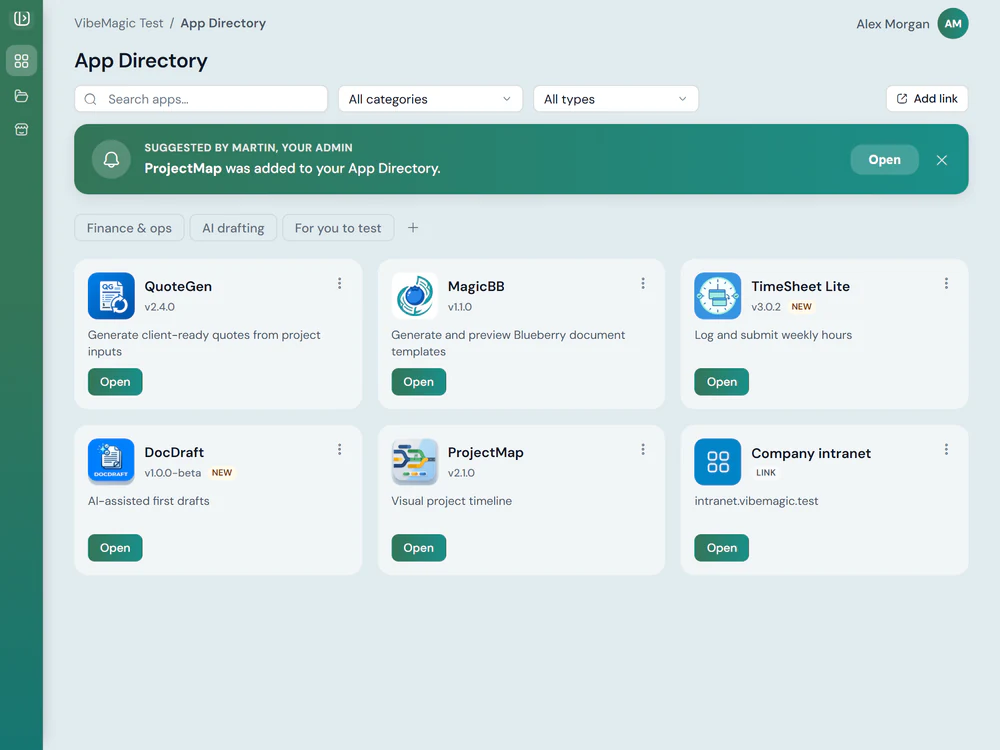
The VibeMagic App Directory as an ordinary user sees it: a searchable grid of published tool cards, each with its icon, name, version and one line on what it does, above a button that opens it
Publish a Tool or App

From built to available in a few steps

When a tool is ready to share, publishing it to the directory is straightforward. You give it a name, a description, a category and an icon. You set which user groups can see and use it. Then you publish, and it appears in the directory for everyone in those groups immediately.

Publishing is available to anyone with the right permissions in the VM Portal. You don't need to involve IT or wait for a release cycle. If a tool needs an update (the underlying prompt logic has improved, or a new version of the app has been deployed), you republish and all users get the updated version without any action on their part.

Tools, not links. Publishing a tool to the directory does more than add a link. It makes the tool part of the managed platform, with access control, version history and usage tracking built in.

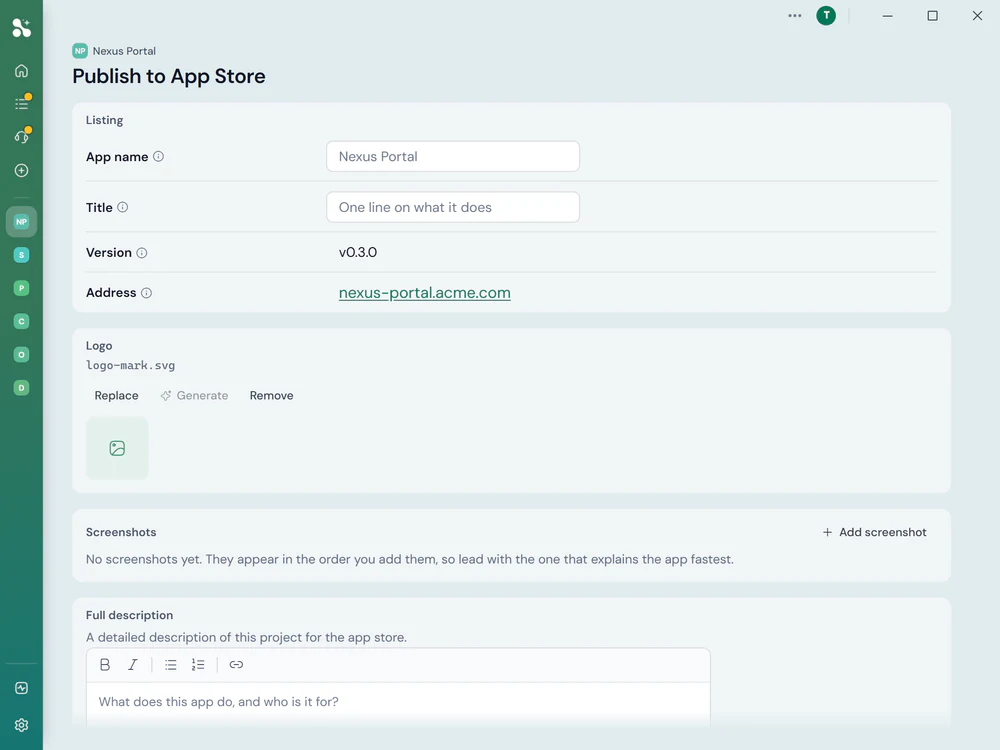
The Publish to App Store form, taking the app's name, a one-line title, its version and address, then its logo, screenshots and a full description
Control Who Sees What

The right tools reach the right people

Visibility in the App Directory is controlled by VibeMagic's user group system. When you publish a tool, you choose which groups can access it: a tool for the accounts team stays out of the directory for everyone else. Users never see tools that aren't relevant to them, and administrators don't have to manage individual permissions.

Groups are managed in the VM Portal. You can create groups specifically for VibeMagic, or import existing Entra ID groups from your Microsoft 365 configuration, so if your organisation already divides teams into Entra groups, those divisions carry straight through to the App Directory without duplication.

One directory, many audiences. The same App Directory serves every team, but each team sees only their tools. Administrators see everything; end users see only what's relevant to them.

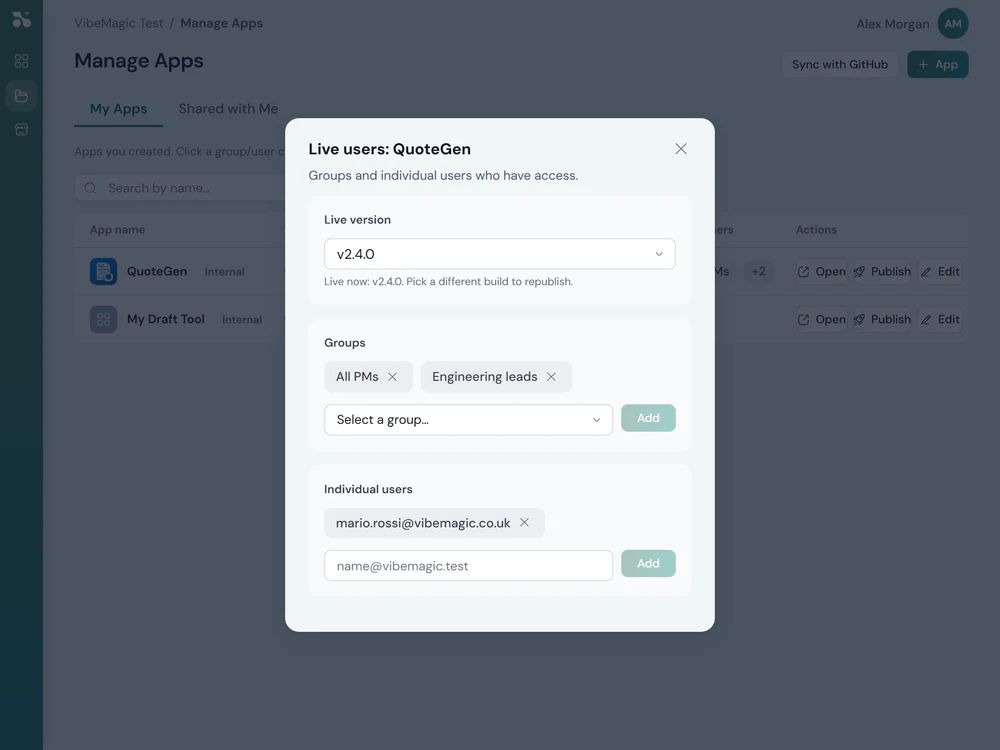
The live users panel for one published tool, naming the version that is live and listing the groups and the individual people who can open it
Track Usage and Manage the Catalogue

Know what's being used, and what isn't

The VM Portal gives administrators a view of the full tool catalogue: what's published, which groups have access, and how tools are being used. Usage data shows which tools are being opened, how often, and by whom, so you can see where AI is actually delivering value across the organisation, not just where it was deployed.

Tools that are superseded can be unpublished cleanly, with users seeing a clear message rather than a broken link. Tools under active development can be published to a subset of users for testing before they go to the full group. The catalogue stays useful rather than accumulating stale links.

A living catalogue, not a graveyard. Most shared tool directories fill up with outdated links nobody touches. VibeMagic's management tools are designed to keep the directory current and useful.

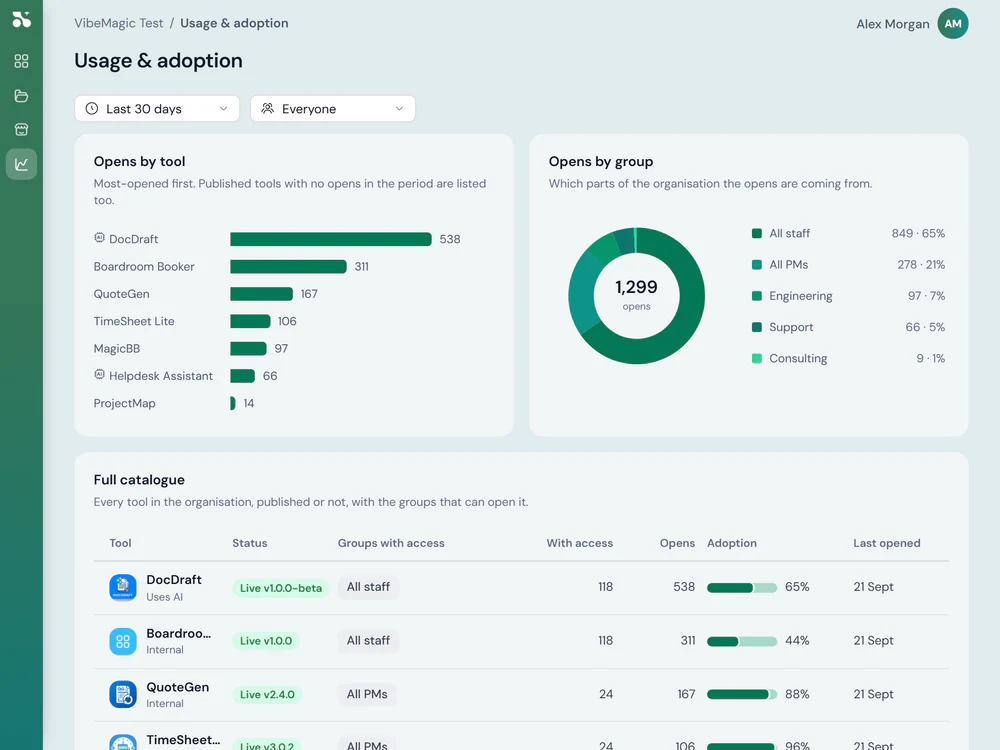
The usage and adoption view, charting opens by tool and by part of the organisation above a catalogue of every tool with its status, who can reach it and how often it is opened
What You Can Deliver

Tools and apps in any format.

The App Directory isn't limited to web applications. VibeMagic supports tools delivered in whatever format fits the task and the way your users work.

Web applications

Most common

Browser-based tools that open with a link: no installation, no app store, works on any device. The default format for most VibeMagic tools. Accessible from the directory on desktop, mobile or tablet.

Mobile apps

Native iOS and Android applications for tools where a mobile-first experience matters: field work, customer-facing tasks, or anything where a browser interface isn't the right fit.

Desktop apps

Installed Windows or macOS applications for tools that need deeper system access, work offline, or integrate with other desktop software in ways a browser can't support.

Chrome extensions

Browser extensions that augment existing web workflows, overlaying AI assistance onto websites and web applications your team already uses, without replacing them.

Key Facts

Why Deliver changes the equation.

The gap between building something useful with AI and the rest of the organisation benefiting from it is where most of the value is lost. Deliver is designed to close that gap.

No AI subscription required to use tools

End users access tools from the directory without needing their own AI subscription. The AI is embedded in the tool. The user just uses the tool. This removes the per-seat cost barrier that prevents most organisations deploying AI broadly.

Update once, everyone gets it

When a tool improves (better logic, new capabilities, a revised approach), you update and republish. Everyone using the tool gets the improvement automatically. There's no version drift, no stale copies, no users running yesterday's approach.

Organisational capability, not individual skill

A published tool encodes the expertise of whoever built it. When that person moves teams or leaves the organisation, the tool stays. The knowledge is in the platform, not in someone's personal prompt library.

Usage you can see and govern

Every tool in the directory has usage data attached to it. You can see which tools are delivering value, which are unused, and where adoption is concentrated. AI spend becomes accountable rather than invisible.

Make AI work for everyone in your organisation.

Not just the people who are good at prompting. VibeMagic's App Directory turns individual productivity into shared capability.