
Auto Transcript Save
- No AI cost
- Setup: Low
Requires M365 app registration
Automatically emails the transcript of completed Microsoft Teams meetings to the meeting organiser. Runs as a background service with no ongoing user action required.
A catalogue of pre-written, production-ready tools and applications that you can trial, purchase, deploy to your own infrastructure, and modify, all within the VibeMagic platform. No development team required to get started.
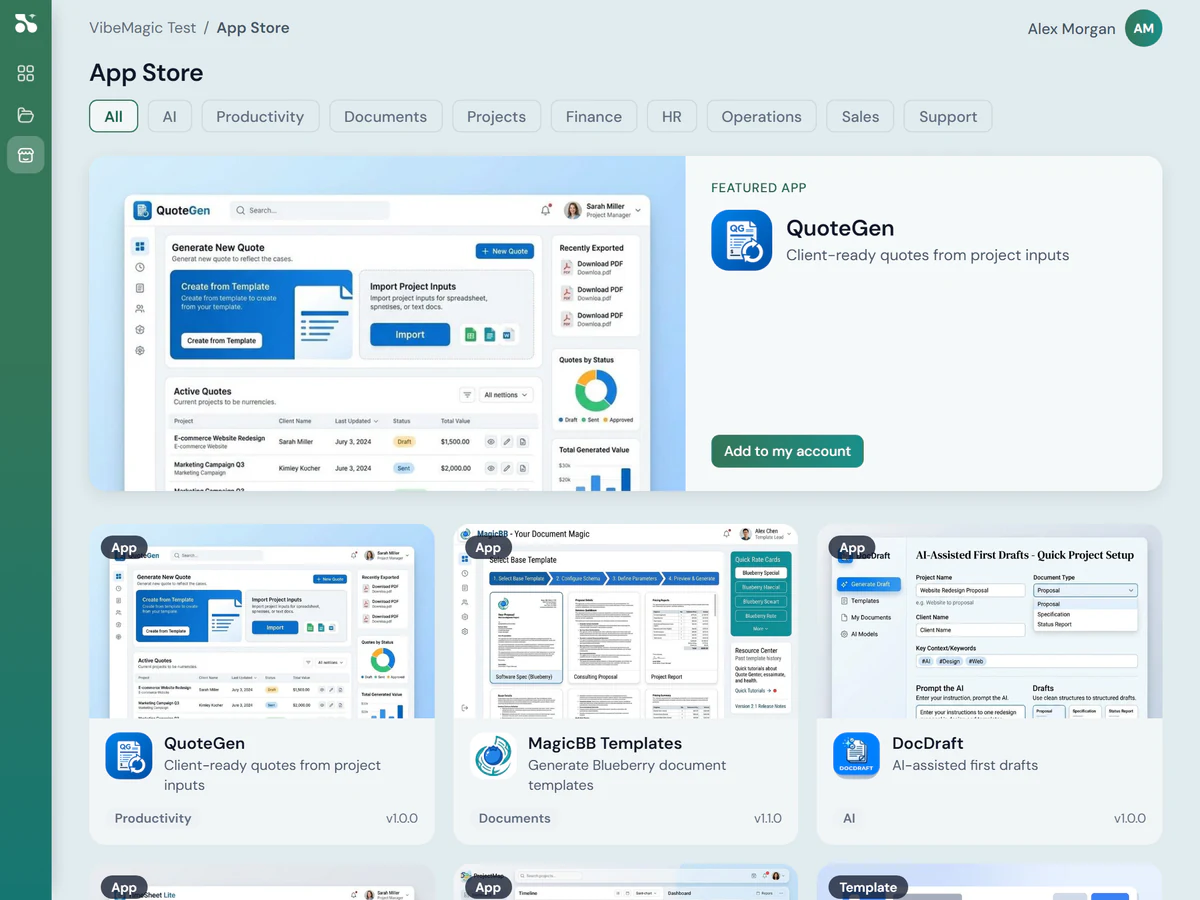
The App Store is designed so that an administrator (not a developer) can take an app from discovery to live deployment for their team. Each stage is described below.
The App Store is searchable by category, use case, and complexity. Apps are labelled by setup friction (how much configuration is typically required) and whether they use AI processing (which has an ongoing token cost) or run entirely as conventional software (no running cost beyond the server).
Each app listing includes a plain-language description of what the app does, its technical requirements, and an indication of which types of users tend to benefit most.
Apps can be trialled before purchase. When you buy an app, you receive the full source code, copied into a code repository that belongs to your organisation. This is a critical distinction from SaaS: if you later decide to stop using the VibeMagic platform, the code remains yours and can continue to be maintained independently.
Source code ownership. Purchasing an app grants a licence to the source code. Your copy lives in your own GitLab or GitHub repository. VibeMagic does not host or control your deployed apps.
Before the app is built, you review its configuration. This typically includes naming the app, reviewing the size of the server and where to host it, and confirming any integration settings: for example, whether the app needs access to Microsoft 365 data such as email or Teams.
Most small tools require minimal configuration at this stage. More complex apps may surface additional options, and the VibeMagic support team can assist with configuration if needed.
Once configuration is confirmed, the app is built and deployed automatically. The source code is pushed to your GitLab or GitHub repository, a build pipeline runs, and the app is deployed to the server you selected, typically within a few minutes for a small tool.
If the build encounters an error, the VibeMagic support team is notified and will assist in resolving it. You do not need to manage the build pipeline directly.
Your infrastructure. Apps run on servers you control: your own AWS, Azure, or on-premises hardware. VibeMagic manages the deployment process; the running application is entirely within your environment.
Once deployed, the app appears in your account with a direct link to run it. At this stage it is only visible to you, not yet published to other users in your organisation. Most small tools are delivered as web applications, accessible via any browser. The platform also builds mobile apps, desktop apps, web sites and Chrome extensions.
Test the app against your real data and use cases. If something isn't right, you can change it before publishing.
For larger apps: more substantial modifications are made using VibeMagic Desktop alongside mainstream AI coding tools (Claude, GitHub Copilot, Cursor). VibeMagic Desktop adds deployment, code review and testing tooling on top of these tools, integrating your changes back into the platform.
The VibeMagic support team can also make changes for you, on request.
When you're satisfied with the app, you publish it to users or user groups within your organisation. Published apps appear in the VibeMagic App Directory, a searchable internal catalogue visible to each user based on their group membership. Users only see apps they have permission to access.
New apps are highlighted to users when they first appear. Users can add apps to their Portal home page for quick access.
Role-based access. Each app has a designated Maintainers group (who can modify it) and a Users group (who can access it). Users outside the Users group cannot see the app at all.
The following apps are available or in development. Each is labelled with its setup complexity and whether it uses AI processing (which has an ongoing token cost) or runs as conventional code.
Requires M365 app registration
Automatically emails the transcript of completed Microsoft Teams meetings to the meeting organiser. Runs as a background service with no ongoing user action required.
Style training required
A background service that monitors your inbox and drafts AI-generated replies to new emails. Includes a pre-training step where it reads your existing emails to learn your writing style before going live.
Requires M365 app registration
Write email filing rules in plain English ("move anything that looks like an invoice to this folder") and the system uses AI to generate and apply the underlying logic automatically.
Requires M365 app registration
Reads email signatures and inbox activity to automatically maintain and enrich your contact list. Runs as a background service and surfaces contacts you haven't yet saved.
Branding and config
A customisable web portal that gives your staff a branded home for all their VibeMagic apps. Includes an app directory, role-based visibility, and a favourites list. Rebrand it as your own.
Have a different need?
Mini CRM, Proposal Builder, AI Policy Manager, Marketing Calendar Planner, and Auto Wiki / Project KB are in various stages of design and development.
When you buy an App Store app, you receive the full source code in a repository you own. VibeMagic does not host or operate your apps. They run on your servers, under your control. If you stop using VibeMagic, the code stays with you.
Every app in the store is reviewed by the VibeMagic team before listing. VibeMagic Desktop also includes code review and security analysis tooling for use during customisation. Deeper security testing is available as a paid service for production-critical or internet-facing apps.
Apps that need access to email, Teams, OneDrive, or SharePoint connect via the VibeMagic integration layer. Users sign in with their existing 365 credentials, no separate login. Administrators configure data access centrally; apps request only the permissions they need.
Every user in your organisation gets a VibeMagic account, and there is no charge for people to use the platform and build apps. Some apps may carry a per-seat charge. AI-powered apps carry a token cost for usage, tracked per user in the platform.
Talk to the Blueberry team about which apps make sense for your organisation, and how to get your first deployment live.