Catch us at Birmingham Tech Week, October 2026
Capabilities: The Platform

Company data access

AI makes building new tools easy, but to be really useful, they need to access company data, which is often hard to achieve. VibeMagic aims to streamline this process, connecting your AI tools and apps to internal systems, shared files, and APIs, all within existing permissions and without replicating data outside your own infrastructure.

  • Microsoft 365 & Entra ID
  • API Directory
  • SharePoint & OneDrive
  • Permission controlled
  • Set up once, used everywhere
How It Works

Three integrated layers of data access.

VibeMagic provides three mechanisms that work together to give AI tools controlled access to company data (identity, APIs, and file stores), all managed centrally and secured using the Microsoft infrastructure you already have in place.

Microsoft 365 Identity

One login, every app, with no friction for users

If you login with Microsoft 365, you're also using Entra ID, the Microsoft system that manages users, groups and two-factor authentication. VibeMagic integrates directly with Entra ID, so when users log in to any VM app or tool, they use their existing 365 account. There are no separate credentials to manage and no new user directories to maintain.

After the initial login, users move between apps and tools with no further login prompts. Access to resources within VibeMagic is controlled by VM's own user group system, managed directly in the VM Portal. Administrators can create new groups or import existing Entra ID groups, so if your organisation already uses Entra groups to organise teams, you can reuse them without starting from scratch.

Support for other identity providers is on the roadmap. Google Workspace and other authentication systems will be added in a future release. The current release is optimised for organisations already running Microsoft 365.

The VM Portal user group screen, showing groups imported from Entra ID beside the Microsoft 365 sign-in that users arrive through
API Directory

Every API your organisation uses, documented in one place

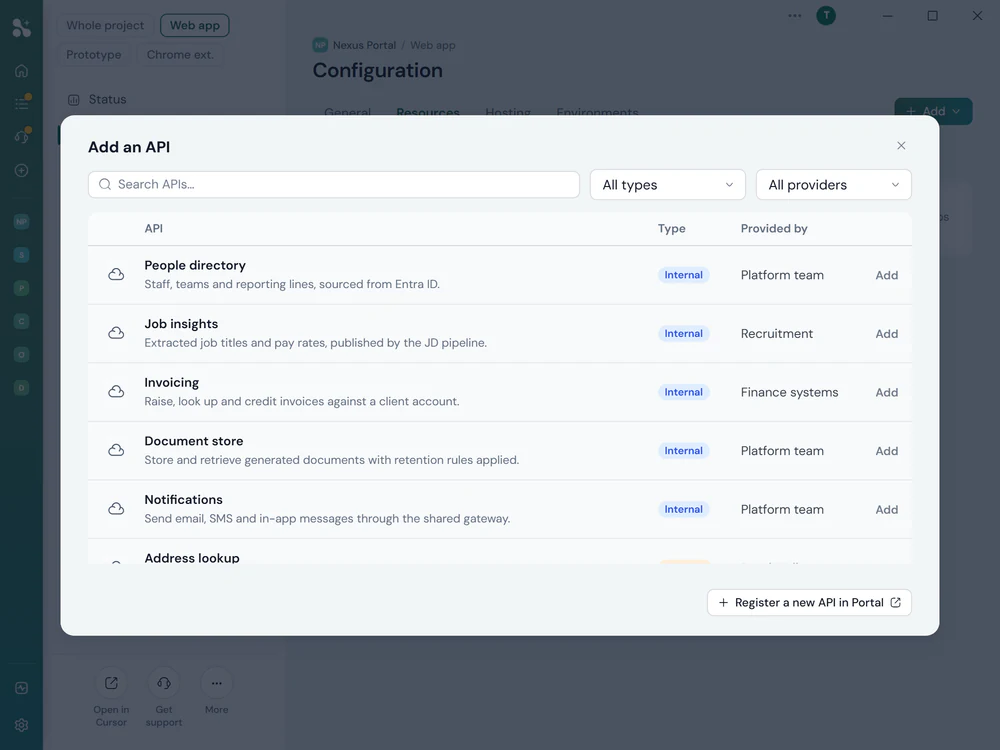
VibeMagic contains a central API directory which holds details on APIs available within internal business systems, plus APIs provided by VM apps and preferred third-party APIs.

This unique tool allows an administrator or consultant to map out and document organisational APIs, converting something normally complex and fragmented into an organised list of available data sources.

When a non-technical user wants to create a tool or app that needs this data, they simply add it to their project and it just works. The AI handles the integration automatically, with no knowledge of API calls, authentication, or request structure required.

Set up once, used everywhere. Every API registered in the directory becomes available to all projects. Credentials are managed centrally. Users get access to the data they need without ever handling raw keys.

The Add an API panel, listing each registered API with its type and the team inside the organisation that provides it, and a link to register a new one in the Portal
File System Access

SharePoint and OneDrive folders, available to every app

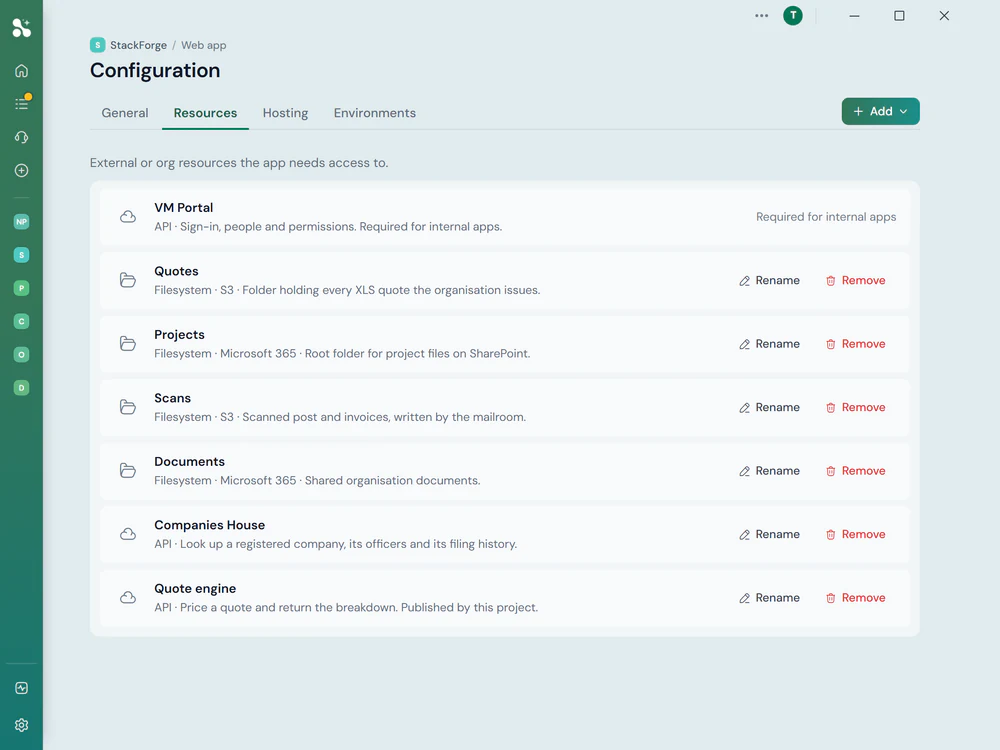
Most organisations that use 365 hold key business information in SharePoint or OneDrive. VibeMagic allows administrators to map these resources within the VM Portal, making them available to AI apps via Microsoft's standard Graph APIs.

An administrator adds a folder (the Marketing Assets library, the Bid folder), specifies which SharePoint site or OneDrive it lives in, and it becomes a named resource that any app can reference. Users add it to their project with a single click; the AI can then read, search and work with the files it contains.

All access happens through standard Microsoft APIs, so security is handled entirely by existing processes. Permissions within Entra ID are respected. If a user doesn't have access to a folder in SharePoint, they don't have access to it through VibeMagic either.

No data is replicated or stored separately. VibeMagic accesses files through Microsoft's own infrastructure. Your data stays where it is, governed by the permissions you already have in place.


A project's Resources tab, listing the filesystem folders it can reach from S3 and from Microsoft 365, each named and described, alongside the APIs it uses
Key Facts

Data access that works the way your organisation does.

VibeMagic doesn't ask you to replicate your data, rebuild your permissions, or adopt new security processes. It works with the infrastructure you already have.

Permissions are inherited, not recreated

Access to every API and file resource is governed by Entra ID. VibeMagic respects existing permissions. If a user can't access something in Microsoft 365, they can't access it through VibeMagic. No shadow permission systems, no duplication.

Internal, external and VM APIs in one directory

The API directory handles all three types: internal system APIs, recommended public APIs, and APIs created by apps built within VibeMagic itself. Users see one consistent interface, regardless of where the data lives.

Data stays in Microsoft's infrastructure

File access happens through Microsoft Graph APIs. Your SharePoint and OneDrive data is never copied, cached or stored outside your own tenant. VibeMagic reads what it needs, when it's needed, through the same APIs Microsoft's own tools use.

One login, no prompts

After the initial 365 login, users move between VM apps and tools without re-authenticating. VibeMagic minimises visible login steps. Users get access to the data they need without the friction that makes people work around security controls.

Ready to connect your data?

Talk to the team about your environment. We'll help you map out which systems, file stores and APIs to register, and get your data directory set up.